
Written by Trivender Singh
Co-Founder at TechniqCo | GEO & AEO Expert specializing in Generative Engine Optimization, Answer Engine Optimization, AI Search Visibility, Technical SEO & Business Growth Scaling.
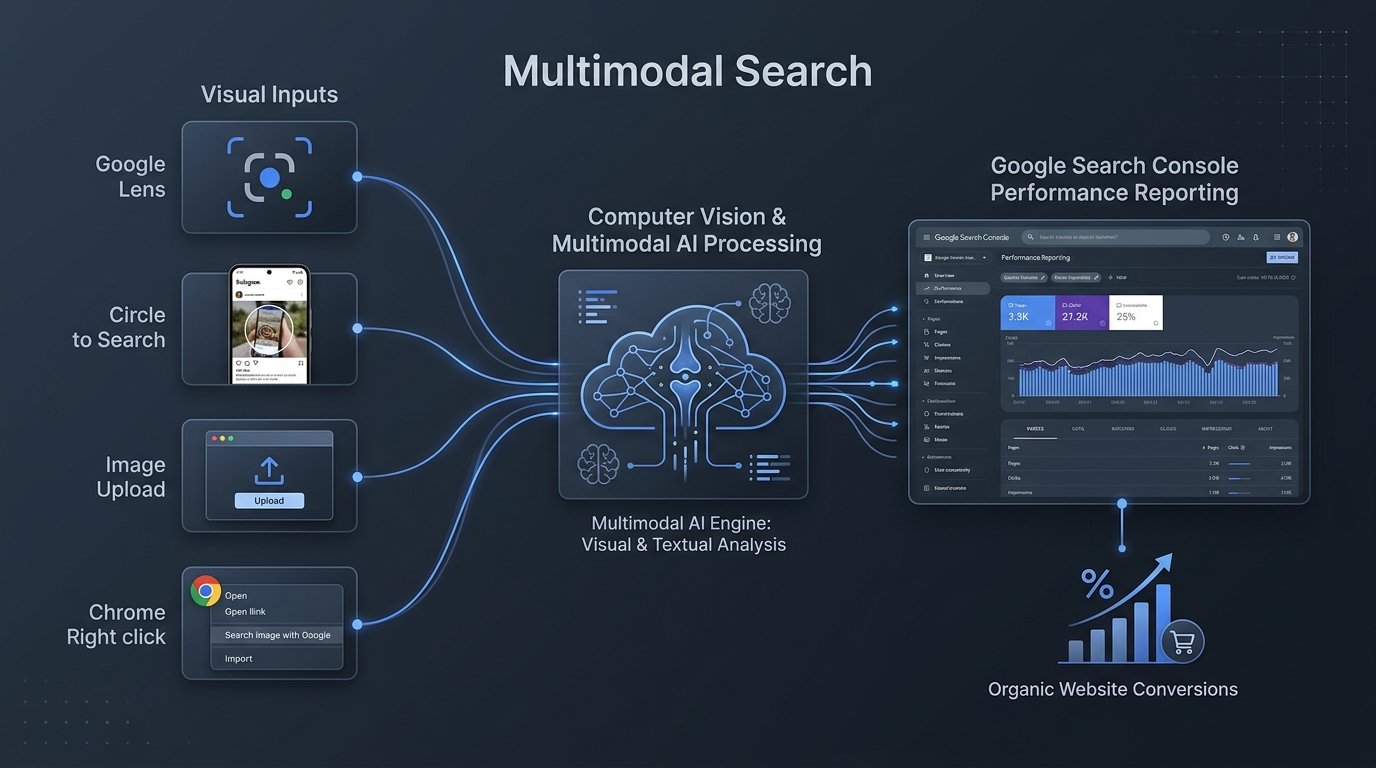
On September 24, 2026, Google Search Central officially launched web multimodal search performance reporting inside Google Search Console. For the first time, site owners and SEO professionals can directly isolate impressions, clicks, click-through rates, and average positions originating from visual, camera-driven, and image-based queries across Google Lens, Circle to Search on Android, direct image uploads, and Chrome’s “Search this image” feature. This data is available in both the standard Performance on Search results report and the Generative AI features performance report.
For teams managing digital marketing, technical SEO, and brand visibility, understanding Google Search Console multimodal search data is essential for measuring how audiences find content through smartphone cameras, screenshots, and visual recognition tools.
This guide provides a comprehensive walkthrough of the new feature:
- What Changed in Google Search Console
- Where to Find the Filter and How to Run a Baseline Audit
- Understanding the Metrics and Available Dimensions
- How to Optimize Content for Visual and Multimodal Search
- Broader Context: How Users Search Visually in 2026
- TechniqCo Strategic Perspective: GEO and Visual Information Gain
- Frequently Asked Questions
1. What Changed in Google Search Console
In the official announcement published on September 24, 2026, Google introduced a dedicated “Multimodal” filter within Search Console’s Performance reporting interface.
Previously, organic search reports grouped all web searches together regardless of whether a query began as typed text or an image capture. The update adds a new way to segment eligible visual search performance; it should not be interpreted as evidence that a site’s actual traffic has increased, but rather as improved visibility into specific visual interactions.
Inputs Included in Multimodal Reporting
Google stated that multimodal reporting includes visual interactions such as:
- Google Lens: Mobile camera scans and real-time visual analysis.
- Circle to Search: Android screen interactions where users circle, tap, or scribble over an image or video.
- Direct Image Uploads: Photos or files uploaded directly into the Google search bar.
- Chrome’s “Search This Image”: Right-click or long-press lookups initiated inside the Google Chrome browser.
Integrated Across Standard and Generative AI Reports
The multimodal filter is available in both the standard Performance on Search results report and the Generative AI features performance report. This allows SEO professionals to analyze visual performance across traditional search result layouts and AI-assisted search experiences.
2. Where to Find the Filter and How to Run a Baseline Audit
Rather than treating this as a high-level industry update, SEO teams should immediately establish a baseline for their domains.
Step 1: Locate the Multimodal Filter
- Open Google Search Console and select your verified property.
- In the left navigation menu, click Performance > Search results.
- At the top of the chart, click the Search type: Web filter.
- In the dropdown, switch from “Text-based” to “Multimodal”.
Performance → Search results → Search type: Web → Multimodal
Step 2: Export Your High-Traffic Visual Landing Pages
Because Google does not display keyword terms for image-based queries, your initial visual search SEO audit should focus entirely on the Pages dimension:
- Click on the Pages tab below the performance chart.
- Sort by Clicks and Impressions to identify your top 10 to 20 URLs.
- Note which URLs generate visual traffic. Are they e-commerce product pages, technical troubleshooting guides, visual comparisons, or infographics?
Step 3: Identify the Visual Gap
Compare your multimodal performance against your standard text performance:
- Identify pages that have high text rankings but zero multimodal impressions.
- Check whether those pages lack clear, original imagery or rely on decorative stock photos.
- Prioritize high-value commercial pages where adding descriptive, high-quality images can help capture camera-based discovery.
3. Understanding the Metrics and Available Dimensions
When analyzing Search Console multimodal data, teams will notice differences compared to traditional text reporting.
Available Metrics
The multimodal report displays standard performance indicators:
- Clicks: Visits to your site originating from supported visual inputs.
- Impressions: How frequently a page URL appeared in visual search results or visual citation units.
- Average CTR: The click-through percentage of visual impressions.
- Average Position: The relative rank of your URL in visual search modules.
Available Dimensions
- Pages: The specific URLs receiving visual traffic.
- Countries: Geographic locations of visual searchers.
- Devices: Breakdown across mobile phones, tablets, and desktop devices.
- Dates: Historical trends over time.
The Missing “Queries” Dimension
A frequent question from site owners is why the Queries tab is unavailable under the Multimodal filter.
Google explained that because these searches originate from images, camera captures, or screenshots rather than typed text strings, there is no textual query string to report. While multisearch queries allow users to append text to an image, the initial Search Console implementation does not isolate text modifiers into a separate query report.
For multimodal search SEO, this means performance analysis must be centered on the Pages dimension and the media assets hosted on those URLs.
| Dimension / Feature | Text-Based Web Search | Multimodal Web Search |
|---|---|---|
| Clicks & Impressions | Available | Available |
| Average CTR & Position | Available | Available |
| Pages Dimension | Available | Available |
| Countries & Devices | Available | Available |
| Queries Dimension | Available (Keyword strings) | Unavailable (Visual-led inputs) |
| Generative AI Report | Integrated | Integrated |
4. How to Optimize Content for Visual and Multimodal Search
Optimizing for visual discovery requires a shift from keyword placement to technical image clarity, semantic markup, and contextual page layout.
A. Asset Quality and Practical Resolution
For large image previews, Google generally recommends images at least 1200 pixels wide where applicable. While this should not be presented as a specific requirement for Lens or multimodal search, high-resolution imagery helps ensure clear visual details when computer vision models analyze items:
- Maintain clean aspect ratios (such as 16:9, 4:3, or 1:1).
- Use modern compression formats like WebP or AVIF to deliver sharp edges and fast load times.
- Replace generic camera file names (such as
DSC_0041.jpg) with descriptive, hyphenated names (such asindustrial-control-valve-flange-assembly.avif).
B. Contextual DOM Proximity
Search engine algorithms evaluate images in connection with the surrounding HTML structure:
- Place primary visual assets directly beneath relevant
<h2>or<h3>topic headings. - Use native
<figure>and<figcaption>HTML elements to bind explanatory captions directly to the image. - Ensure adjacent text clearly explains the function, parts, or specifications depicted in the graphic.
C. Semantic Schema Markup
Structured data helps search engines verify the entities shown on your pages:
- Nest an
ImageObjectschema within your existingProduct,Article, orServiceJSON-LD. - Explicitly declare attributes such as
caption,creditText,contentUrl, andrepresentativeOfPage.
{
  "@context": "https://schema.org",
  "@type": "Product",
  "name": "Precision Pressure Transmitter P-100",
  "image": {
    "@type": "ImageObject",
    "url": "https://techniqco.com/images/products/pressure-transmitter-p100-overview.avif",
    "caption": "Precision pressure transmitter P-100 showing dual output ports and mounting bracket",
    "representativeOfPage": true,
    "width": "1600",
    "height": "1067"
  },
  "description": "Industrial grade pressure transmitter designed for manufacturing and fluid control systems."
}
D. Multi-Channel Visual Alignment
In September 2026, Google also introduced advertising updates that reflect this visual focus, including unified journey reporting in Google Ads AI Max and new visual ad placements in Demand Gen. While paid tools operate independently from Search Console, both updates illustrate Google’s emphasis on connecting visual creative assets directly to landing page outcomes.
5. Broader Context: How Users Search Visually in 2026
To understand the long-term importance of Circle to Search SEO and Google Lens SEO, it helps to review broader search trends.
Scale of Visual Queries
According to official figures published by Google on blog.google, Google Lens processes over 20 billion visual searches every month. Google has also stated that approximately one in four (25%) of visual searches have commercial intent, such as identifying products, checking prices, or finding retailers.
The Shift Beyond Text Queries
In our research on Google Trends for SEO in 2026, we noted that search journeys are becoming increasingly multi-format.
Instead of trying to describe an unfamiliar object with keywords, users increasingly use mobile shortcuts:
- Pointing a camera at a damaged auto part or plumbing fitting.
- Using Circle to Search on an Android screen while browsing social media to find where an outfit or home decor item was purchased.
- Dropping a screenshot into the Google search bar on desktop to locate technical documentation.
By reporting on multimodal interactions, Google Search Console helps site owners see where visual search is already connecting users to their sites.
6. TechniqCo Strategic Perspective: GEO and Visual Information Gain
(Note: The following section represents TechniqCo’s strategic analysis and industry hypotheses regarding Generative Engine Optimization, rather than official Google product claims.)
The Information Gain Hypothesis
In our work on Google Core Update Recovery and Information Gain, we examine how search systems reward content that introduces unique, helpful information to the web index.
Our working hypothesis is that original visual assets can provide more distinctive information than widely reused stock imagery, particularly when they document products, processes, or environments that generic images cannot represent:
- Widely syndicated stock photos provide little new context about a specific brand or product.
- Original diagrams, annotated schematics, detailed product close-ups, and field-tested installations offer unique visual evidence.
- As AI Overviews continue to incorporate visual citations, pages offering clear, original visual documentation may be well-positioned to serve as visual reference points.
Establishing an Early Measurement Baseline
Auditing multimodal data now can help teams establish a baseline and identify which pages are already receiving visual search exposure. For businesses optimizing for both traditional search and generative AI engines, visual assets should be treated as core informational content rather than decorative afterthoughts. For structured prompting workflows, explore our ChatGPT Prompts for SEO and GEO Playbook.
7. Frequently Asked Questions
Where do I find the multimodal filter in Google Search Console?
Open Google Search Console, navigate to Performance > Search results, click the “Search type: Web” filter at the top of the chart, and select “Multimodal.” The filter is also available in the Generative AI features performance report.
Why does the Queries tab show no data under the Multimodal filter?
Google officially confirmed that the Queries dimension is unavailable for multimodal reporting because these searches are initiated using visual inputs (such as photos, screenshots, or camera scans) rather than typed keywords.
Does multimodal search include traffic from the Google Images tab?
No. The “Google Images” report specifically tracks users who navigate to and browse the dedicated Google Images tab. The “Multimodal” filter tracks visual queries occurring within Google’s primary web search and AI-assisted search experiences.
What tools trigger multimodal search traffic?
Google stated that multimodal reporting includes visual interactions such as Google Lens, Circle to Search on Android, direct image uploads in the Google search bar, and Chrome’s “Search this image” feature.
Does this update mean my actual website traffic increased?
No. The update adds a new way to segment eligible visual search performance; it should not be interpreted as evidence that a site’s actual traffic has increased.
Do I need to modify website code to start tracking multimodal visits?
No. Google tracks multimodal search interactions automatically on its own infrastructure. If your pages receive traffic from supported visual search tools, the data will populate in Search Console automatically.
What image resolution is recommended for visual search SEO?
For large image previews, Google generally recommends images at least 1200 pixels wide where applicable. This should not be presented as a specific requirement for Lens or multimodal search, but high-resolution imagery helps ensure clear visual details when computer vision models analyze items.
How should SEO professionals report on multimodal data to clients?
Focus on the Pages dimension. Report on which product pages, technical guides, or visual resources are generating camera-driven traffic, and highlight how visual optimization supports total organic discovery.
Audit Your Multi-Search Readiness with TechniqCo
Want to know how your website is performing across traditional, visual, and AI-powered search? TechniqCo can audit your technical SEO, visual search visibility, structured data, and GEO readiness.
Schedule an SEO & GEO Audit →Related posts:
 How to Use Google Trends for SEO in 2026
 Google Maps in the AI Era: How Gemini & Multimodal Search Are Changing Local 3-Pack Rankings in 2026
 Gemini AI Editor for YouTube: Features, How It Works, and What Creators Need to Know in 2026
 How To Generate Leads On Meta? Follow These Steps, Proven Methods!
 SEO for Travel Website: How To Generate Quality Leads Through Website Traffic
 The Ultimate On-Page SEO Checklist 2026: 47 Points to Rank #1 on Google