
To remove the visible four-pointed sparkle watermark from Google Gemini AI images and Gemini Veo videos without losing image quality, use a specialized Reverse Alpha Blending tool rather than generative inpainting. The free, browser-based TechniqCo AI Watermark Remover mathematically inverts Google’s linear composite equation directly on your device. This restores genuine original pixels with 100% lossless fidelity, preserves video audio tracks, and requires zero file uploads to external servers.
Google Gemini and its dedicated video foundation model, Gemini Veo, represent significant leaps forward in synthetic media generation. Creative studios, marketing agencies, and independent creators routinely deploy these models to draft photorealistic product visuals, architectural environments, and high-impact social clips.
Yet every raw export directly downloaded from Google Gemini contains a persistent aesthetic obstacle: a semi-transparent, four-pointed sparkle logo stamped into the bottom corner. For professional creators preparing brand presentations, e-commerce storefronts, or commercial client campaigns, this visible stamp distracts viewer focus, compromises visual symmetry, and labels premium assets as unedited drafts.
To eliminate this friction losslessly and ethically, TechniqCo built the TechniqCo AI Watermark Remover: a dedicated, zero-cost web tool that removes the visible Gemini watermark from images and videos entirely inside your browser. This technical guide outlines how the tool operates, the mathematical failure of generative inpainting, the mechanics of Reverse Alpha Blending, and best practices for creative workflows in 2026.
1. The Two Layers of AI Watermarking: Visible Sparkle vs DeepMind SynthID
Before modifying synthetic media, creators must understand Google’s two distinct watermarking mechanisms:
- The Visible Alpha Overlay: A semi-transparent white four-pointed star composited over the bottom corner of exported graphics and videos. Its sole function is visual branding. It notifies viewers that an asset originated from Google Gemini.
- The Invisible Cryptographic Watermark (SynthID): Developed by Google DeepMind, SynthID embeds imperceptible mathematical signals directly into the latent space pixels and audio frequency spectrum. It survives compression, cropping, color grading, and format transcoding.
Ethical Compliance & AI Provenance: The TechniqCo AI Watermark Remover targets only the visible alpha overlay. It does not alter or strip Google DeepMind SynthID identifiers. Commercial organizations remain fully aligned with C2PA metadata standards and AI provenance verification while presenting immaculate creative work to clients.
2. Why Traditional AI Inpainting Destroys Media Fidelity
When creators attempt to remove the Gemini watermark using conventional software (such as Photoshop Content-Aware Fill, generic online object removers, or secondary diffusion inpainters), they often encounter visible degradation. Understanding why this happens requires examining how inpainting functions compared to mathematical restoration.
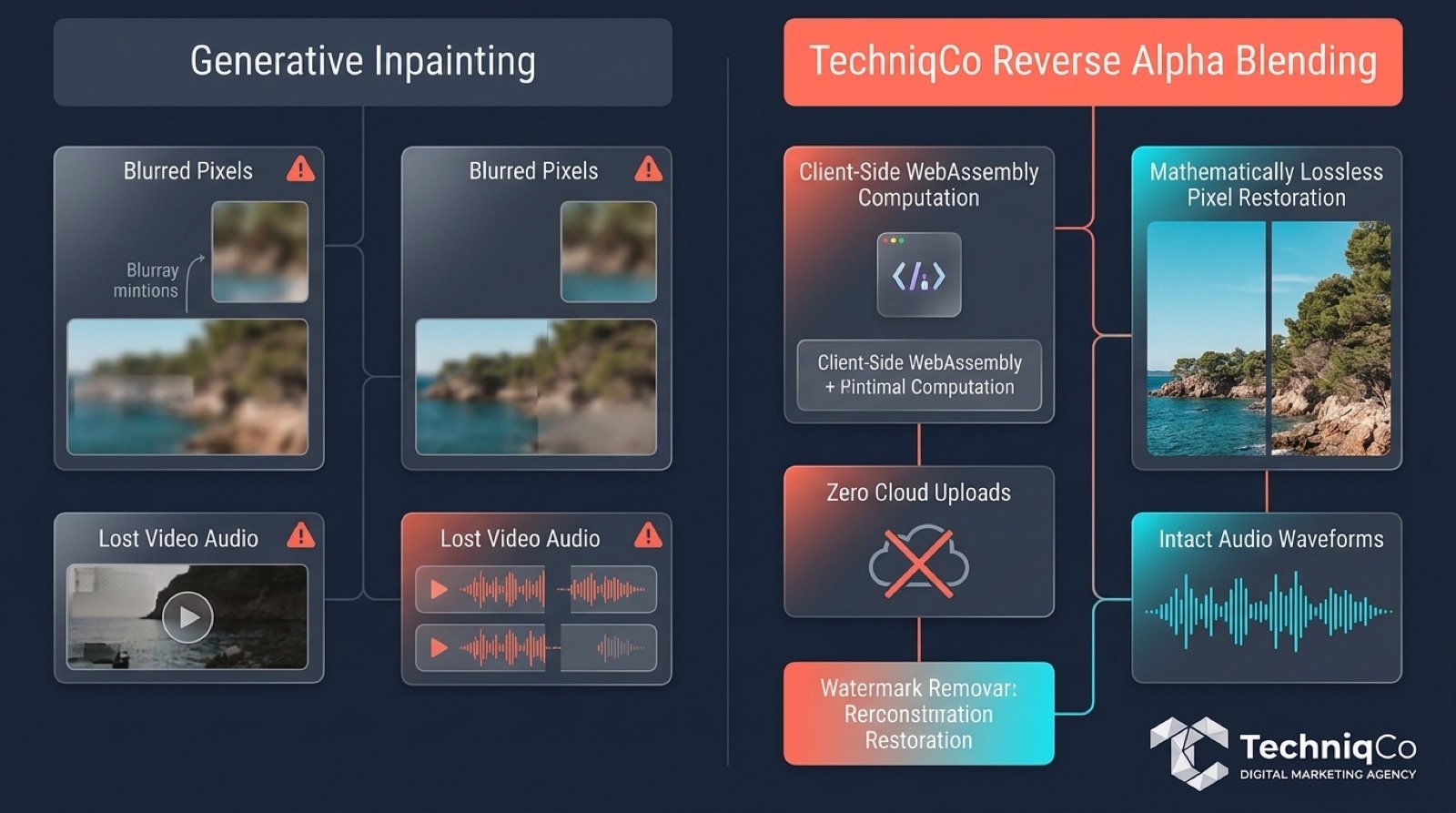
The Failure Mechanism of AI Inpainting
Generative inpainting treats the watermarked area as destroyed data. It cuts a bounding box around the sparkle logo and asks a neural network to hallucinate new pixels based on surrounding pixel context. This creates three distinct failure modes:
- High-Frequency Detail Smudging: Skin textures, fabric weaves, architectural edges, and natural foliage get replaced with smooth, artificial gradients.
- Color Boundary Halos: Neural inpainters struggle with sharp contrast, often generating a dull gray or discolored aura around the former logo boundaries.
- Video Frame Jitter: On video timelines, frame-by-frame generative guessing produces temporal incoherence: an intolerable boiling artifact where the corner shifts texture every 30th of a second.
3. The Mathematical Solution: Reverse Alpha Blending
Google does not overwrite underlying pixels with opaque white paint. Instead, it applies standard computer graphics linear alpha compositing. The original pixel color data is still present underneath the watermark, mathematically altered by a known opacity curve.
Google’s Alpha Composite Equation
C_out = (1 - α) × C_orig + α × C_wm
Where C_out represents the final observed pixel, C_orig is the pristine generated artwork, C_wm is the watermark color matrix, and α represents the channel transparency coefficient.
Because the watermark position, shape, and opacity map are identical across all Gemini exports, the formula can be mathematically inverted without any guesswork:
TechniqCo Exact Inverse Restoration Formula
C_orig = (C_out - α × C_wm) / (1 - α)
By executing this inverse calculation across the watermark bounding matrix, every pixel is restored to its exact numeric value before the logo was composited. The result is zero blur, zero haloing, and 100% mathematical fidelity.
How to Use the Free Tool in 5 Steps
- Access the Web App: Navigate to the TechniqCo AI Watermark Remover in any browser (desktop or mobile).
- Import Your Media: Drag and drop your Gemini image (PNG, JPG, WebP) or Gemini Veo video clip (MP4, WebM, MOV) into the drop zone.
- Automatic Coordinate Detection: The client-side engine locates the watermark corner coordinates and selects the matching alpha channel matrix.
- Lossless Processing: Click Remove Watermark to run the Reverse Alpha Blending algorithm. Images process in under 200 milliseconds.
- Export Pristine File: Click Download Clean File to retrieve your uncompressed, watermark-free asset instantly.
4. Frame-by-Frame Video Processing for Gemini Veo
Video watermarks present a substantially greater engineering hurdle than static graphics. As detailed in our comprehensive guide on the Gemini AI Editor for YouTube, Google is actively integrating Veo generative video into YouTube Shorts and YouTube Create workflows.
Every Veo video export includes the corner sparkle. Traditionally, editors attempting to remove video watermarks were forced into one of three compromises:
- Cropping the Frame: Zooming in by 10% to 15% to push the watermark off-screen, which damages composition and degrades output resolution.
- Manual Tracking and Blurring: Tracking a gaussian blur mask over the corner in DaVinci Resolve or Premiere Pro, creating an eye-catching smudge that draws immediate attention.
- Third-Party Cloud Converters: Uploading the entire video file to sketchy conversion sites that heavily compress bitrates and often strip the audio track entirely.
How TechniqCo Handles Veo Video Watermarks
The TechniqCo engine implements client-side video decoding:
- Sequential Canvas Extraction: The video stream is decoded in-browser using HTML5 Canvas and WebCodecs, isolating each frame at its native frame rate (24fps, 30fps, or 60fps).
- Per-Frame Mathematical Inversion: Reverse Alpha Blending is executed across each frame’s watermark coordinates, ensuring flicker-free consistency across moving cameras.
- Lossless Audio Multiplexing: The original audio track is preserved in its original encoding and muxed back into the video stream with zero drift.
- Full Container Support: Handles standard MP4, WebM, and MOV formats exported from Gemini environments.
5. The Privacy Imperative: 100% Client-Side In-Browser Security
For creative agencies, enterprise marketing teams, and corporate communications departments, digital asset confidentiality is paramount. Standard watermark removal tools require uploading your files to remote cloud servers, creating substantial business risks:
- Data Leakage: Unannounced product designs, executive concept art, or confidential campaign creative sitting on unsecured third-party servers.
- Model Scraping: Many free online tools insert clauses into their terms of service granting them rights to use uploaded media to train proprietary AI models.
- Bandwidth Bottlenecks: Uploading 4K video files over residential or mobile connections introduces unnecessary delay.
The Zero-Server Architecture Guarantee
The TechniqCo AI Watermark Remover executes 100% of all operations locally on your client machine. Your files never travel across the internet. No server receives your images, no remote databases store your video frames, and no third-party cookies track your creative output. You can even disconnect your internet connection once the page is loaded and process files offline.
| Evaluation Metric | TechniqCo Watermark Remover | Standard Cloud Inpainters |
|---|---|---|
| Underlying Algorithm | Mathematical Reverse Alpha Blending | Generative Neural Inpainting (Guessing) |
| Pixel Fidelity | 100% Lossless (Original Pixels Restored) | Lossy (Smudged textures & color halos) |
| Data Location & Privacy | 100% Local Device (Zero Server Upload) | Uploaded to Remote Cloud Servers |
| Veo Video Capabilities | Frame-by-frame canvas with synced audio | Often strips audio or re-encodes at low bitrate |
| Pricing & Account Friction | Free Forever (No Login, No Credits, No Caps) | Freemium paywalls, credit limits, watermarked demos |
6. Best Practices: Optimizing AI Visuals for Search and Commercial Publishing
Once your visual media is restored to pristine condition, maximizing its impact across search engines and AI discovery tools (such as the new visual tracking interfaces covered in our Google Search Console Multimodal Search guide) requires adherence to several technical standards:
- Export Directly from Gemini: Always use Google’s native Download button to save the source asset at full raster resolution. Avoid screenshotting your browser window, as screen captures resample pixel boundaries and introduce compression noise that can degrade alpha calculation.
- Process Prior to Secondary Edits: Run the TechniqCo Watermark Remover on raw, unedited exports before applying color grading, LUTs, crops, or graphic overlays in Premiere, DaVinci, or Photoshop. Operating on the pristine export ensures the alpha transparency curve matches Google’s mathematical template exactly.
- Convert to Modern Web Formats: After watermark removal, encode your final web images in AVIF or WebP formats. This preserves clean edges and sharp color depth while reducing payload weight for superior Core Web Vitals performance.
- Leverage Structured Data: If publishing AI-assisted imagery on commercial websites, annotate your media using
ImageObjectJSON-LD schema, declaring relevant creator, credit, and license properties to support clear search engine entity attribution.
7. Frequently Asked Questions
Does this tool upload my images or videos to an external server?
No. All file processing occurs 100% inside your local web browser using client-side JavaScript, HTML5 Canvas, and WebAssembly. Your files never leave your device, ensuring total privacy for sensitive commercial and client assets.
Which file formats are supported?
The application supports PNG, JPG, and WebP still images, as well as MP4, WebM, and MOV video containers downloaded directly from Google Gemini and Gemini Veo.
Can it remove watermarks from Gemini Veo videos without losing audio?
Yes. The video processing pipeline decodes and cleans visual frames sequentially while preserving the original audio track in full fidelity, remuxing it with frame-accurate synchronization.
Does this tool remove Google DeepMind’s invisible SynthID watermark?
No. The tool removes only the visible four-pointed sparkle logo from the corner. The invisible cryptographic SynthID digital watermark embedded within the latent pixel noise remains untouched, ensuring compliance with AI safety and provenance standards.
Is the TechniqCo AI Watermark Remover completely free?
Yes. The web app is completely free and open for public use with no login, no account registration, no credit card requirement, and no daily usage caps.
Why is Reverse Alpha Blending superior to Photoshop generative fill?
Generative fill deletes the watermarked area and guesses replacement pixels, leading to blurred textures, color haloing, and loss of original detail. Reverse Alpha Blending mathematically subtracts the known watermark overlay to reveal the genuine, original pixels with 100% mathematical precision.
Restore Your AI Media to Pristine Quality Today
Eliminate distracting corner watermarks from your Google Gemini images and Veo videos in seconds. Experience lossless, instant in-browser watermark removal with zero server uploads, complete privacy, and zero cost.
Launch Free Watermark Remover →Ready to Scale Your Visual and AI Search Visibility?
Want to know how your website and digital media are performing across traditional, visual, and AI-powered search? TechniqCo can audit your technical SEO, visual search visibility, structured data, and GEO readiness to ensure your brand dominates AI search discovery.
Request a Visual SEO & GEO Audit →Related posts:
 Gemini AI Editor for YouTube: Features, How It Works, and What Creators Need to Know in 2026
 How to Use Google Trends for SEO in 2026
 Google Search Console Multimodal Search: How to Track Visual Search Traffic in 2026
 Link Building for Indian Startups: 10 Strategies to Get High-Authority Backlinks Without an Agency
 The Ultimate On-Page SEO Checklist 2026: 47 Points to Rank #1 on Google
 Jev AI by TypeSafe AI: The Complete Guide to the System One Decision Model (2026)