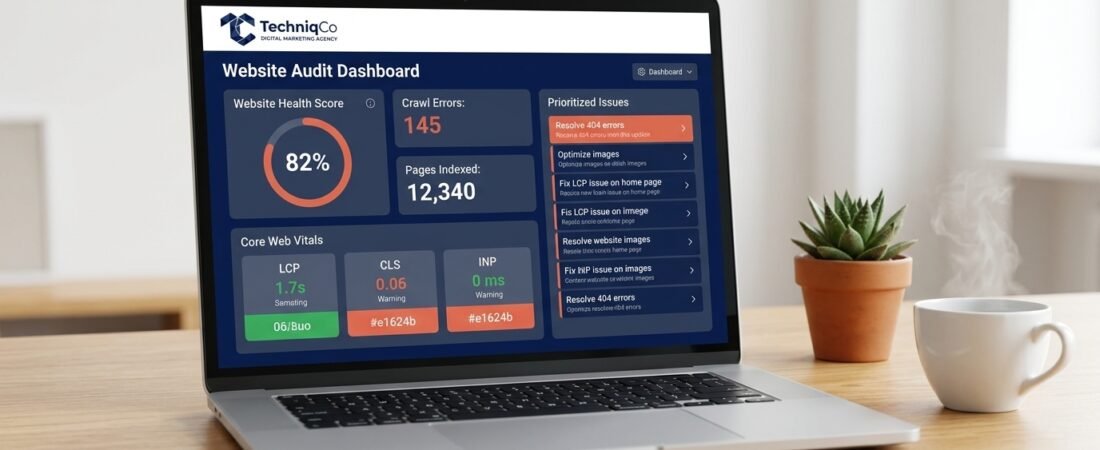
Your website is your digital storefront. However, if your pages load slowly, display broken links, or miss basic SEO tags, you lose valuable leads every day.
A website audit solves this problem. It acts as a complete check-up for your site. By running an audit, you uncover hidden technical errors, fix performance bottlenecks, and boost your search rankings.
In this guide, you will learn how to perform a full website audit step by step. We will cover technical SEO, on-page fixes, page speed, and backlink checks.
What Is a Website Audit and Why Do You Need One?
A website audit evaluates your site’s technical health, user experience, and search visibility. Afterwards, it gives you a clear action plan to improve your rankings.
If you skip regular audits, small technical errors compound over time. For instance, a missing canonical tag can cause duplicate content penalties. Similarly, uncompressed images slow down your page loading speed.
As a result, businesses that conduct quarterly audits consistently outperform their competitors in search results.
To learn how an audit fits into your broader growth plan, explore our complete SEO and digital marketing services.
Essential Audit Tools to Set Up First
Before you start, set up access to these free and paid audit tools:
| Tool Name | Primary Purpose | Cost |
|---|---|---|
| Google Search Console | Track index errors, manual actions, and search traffic | Free |
| Google Analytics 4 | Monitor traffic sources, user engagement, and conversions | Free |
| PageSpeed Insights | Test Core Web Vitals (LCP, CLS, INP) | Free |
| Screaming Frog | Crawl site URLs, meta tags, and broken links | Free (up to 500 URLs) |
| Ahrefs / SEMrush | Analyze backlinks, target keywords, and technical health | Paid |
| GTmetrix | Diagnose page speed and asset loading speed | Free |
Step 1: Crawl Your Entire Website
First, you must crawl your website using an automated crawler. Open Screaming Frog SEO Spider, enter your domain name, and start the crawl.
Once the crawl finishes, review the results for these common errors:
- 4xx Broken Links: Any 404 error page damages user experience. Fix these immediately using 301 redirects.
- 5xx Server Errors: Server error codes mean your web host failed to deliver the page. Contact your hosting provider to resolve these issues.
- Redirect Chains: Multiple consecutive redirects (Page A → Page B → Page C) slow down page speed. Therefore, point Page A directly to Page C.
- Orphan Pages: These are pages without any internal links. Because crawlers cannot find orphan pages easily, add internal links to connect them.
For server performance tips, check out our guide on fixing WordPress Core Web Vitals.
Step 2: Audit Your Technical SEO Setup
Technical SEO ensures search engines can crawl and index your site without issues. If crawlers struggle to read your pages, your content will not rank.
1. Check Indexing in Google Search Console
Log into Google Search Console and click on Pages under the Indexing section.
- Indexed Pages: Verify that all your important service and blog pages are indexed.
- Excluded Pages: Check why certain pages are excluded. Ensure you are not blocking valuable content accidentally.
- Crawled – Not Indexed: These pages need content updates or better internal links to gain index status.
2. Check Your robots.txt File
View your file by typing https://yoursite.com/robots.txt in your browser. Next, confirm that:
- You are not blocking important pages like
/blog/or/services/. - Your XML sitemap link is included at the bottom of the file.
3. Test Your XML Sitemap
Visit https://yoursite.com/sitemap.xml to verify your sitemap. Make sure it contains only active 200-status URLs. Never include 404 pages or redirected links inside your sitemap.
4. Verify Your SSL Certificate (HTTPS)
Ensure every page loads securely over HTTPS. Look for the lock icon in your address bar. Furthermore, fix any mixed content warnings where HTTP images load on HTTPS pages.
Step 3: Audit On-Page SEO Elements
On-page SEO tells search engines what your content means. Audit your metadata using Screaming Frog to find and fix errors quickly.
Fix Title Tags
Title tags remain a top ranking factor. Therefore, keep them optimized:
- Keep Titles Short: Target 50 to 60 characters so search engines do not cut them off.
- Avoid Duplicates: Give every single page a unique title.
- Avoid Bare Words: Generic titles like “Services” perform poorly. Instead, add target keywords and your brand name.
Here are examples of optimized titles:
| Page Type | Poor Title | Optimized Title |
|---|---|---|
| Services | Services | Digital Marketing Services in Delhi — TechniqCo |
| About Us | About | About TechniqCo — Digital Marketing Agency |
| Blog | Blog | Digital Marketing Blog — SEO & Growth Tips |
Optimize Meta Descriptions
Meta descriptions encourage searchers to click on your link. Consequently, write clear descriptions under 155 characters and include a compelling call to action.
Fix Heading Hierarchy (H1, H2, H3)
Structure your text cleanly so readers and crawlers can scan your content:
- Use One H1: Every page needs exactly one
<h1>tag. - Use H2 and H3 Subheadings: Break your text into small sections every 150 to 200 words.
Add Image Alt Text
Alt text describes your graphics to search engines and screen readers. As a result, fill in alt tags for all images using descriptive, natural keywords.
Step 4: Audit Content Quality and Internal Links
Google rewards high-quality, helpful content that demonstrates real experience (E-E-A-T).
Remove or Upgrade Thin Content
Pages with under 300 words often struggle to rank. You can fix thin content in three ways:
- Expand: Add detailed, helpful information to reach 800+ words.
- Merge: Combine smaller, related posts into one comprehensive guide.
- Noindex: Add a
noindextag to low-value utility pages.
Build Strong Internal Links
Internal links pass ranking power across your website. Make sure every post links to 3–5 related articles using natural anchor text.
For example, your guide on Google Business Profile optimization should link naturally to your local SEO checklist.
Step 5: Audit Page Speed and Core Web Vitals
Page speed directly affects both user conversion rates and Google rankings. Run your key URLs through Google PageSpeed Insights and check these metrics:
| Core Web Vital | Metric Focus | Target Score |
|---|---|---|
| LCP (Largest Contentful Paint) | Main image/text load speed | Under 2.5 seconds |
| CLS (Cumulative Layout Shift) | Visual movement during load | Under 0.1 |
| INP (Interaction to Next Paint) | Click and tap responsiveness | Under 200ms |
Quick Speed Fixes:
- Convert large PNG images into lightweight WebP format.
- Defer heavy scripts so your main content paints first.
- Enable server-side caching on your web host.
Step 6: Audit Your Backlink Health
Backlinks act as votes of confidence for your site. Use Ahrefs or SEMrush to review your link profile:
- Track Unique Domains: Focus on earning links from high-authority, relevant websites.
- Remove Toxic Links: Look out for spammy links from foreign directories. If necessary, disavow low-quality links via Google Search Console.
- Vary Anchor Text: Avoid repeating identical keyword anchors. Instead, use natural variations to prevent over-optimization penalties.
Step 7: Validate Schema Markup and Security Headers
Schema markup helps search engines and AI assistants (like ChatGPT and Gemini) understand your business data.
- Add Schema Types: Use
Organizationschema on your home page,Serviceschema on service pages, andArticleschema on blog posts. - Test Your Code: Validate your structured data using Google’s Rich Results Test tool. To learn how AI search engine optimization works, review our GEO services page.
- Check Security Headers: Verify that your server returns
X-Content-Type-OptionsandX-Frame-Optionsheaders to block vulnerability scans.
Step 8: Build a Prioritized Action Plan
After your audit, group your tasks by priority level so you can fix critical errors first:
| Priority | Issue Type | Action Timeline |
|---|---|---|
| 🔴 Critical | 404 errors on key pages, missing SSL, indexing blocks | Fix within 24 hours |
| 🟠 High | Duplicate H1 tags, missing meta descriptions, broken redirects | Fix within 1 week |
| 🟡 Medium | Missing alt text, thin content pages, slow LCP speed | Fix within 1 month |
| 🟢 Low | Minor internal link tweaks, social preview tags | Fix within 3 months |
Get a Free Website Audit from TechniqCo
Performing a detailed website audit takes time and technical expertise. If you want to save time and discover your top ranking opportunities quickly, we can help.
At TechniqCo, we deliver comprehensive website audits with clear, step-by-step action plans to boost your traffic and leads.
Related Reading:
- SEO, GEO & AEO: Dominating Search in the AI Era
- How to Optimize Your Google Business Profile
- B2B Lead Generation Funnels: Convert Traffic into Sales
Ready to fix your technical errors and boost your rankings? Book a free website audit with TechniqCo today!
Related posts:
 The Ultimate On-Page SEO Checklist 2026: 47 Points to Rank #1 on Google
 Link Building for Indian Startups: 10 Strategies to Get High-Authority Backlinks Without an Agency
 What Is SEO And How It Is Creating Trillion Dollar Industry By Increasing Website Traffic
 How to Optimize Your Google Business Profile: The Complete 2026 Guide for Local Visibility
 Domain Rating Guide: How to Increase Your Website Authority in 2026
 Google Business Profile Suspended in 2026? Step-by-Step Appeal & Reinstatement Guide (Soft & Hard Suspensions)